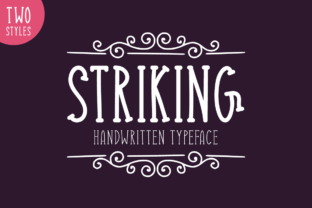
Striking Font
Striking is a display typeface designed for visual impact. It belongs to the category of bold, high-contrast serif fonts with distinctive letterforms—characterized by dramatic stroke variation, sharp serifs, and strong vertical stress. Unlike text fonts optimized for long-form readability, Striking prioritizes presence, personality, and memorability at larger sizes.
What Makes Striking Distinctive?
Striking stands out due to its intentional departure from conventional typographic norms. Its uppercase letters feature exaggerated terminals, slightly flared serifs, and asymmetrical details that lend a hand-crafted yet refined impression. The lowercase set maintains cohesion while introducing subtle quirks—such as a tilted crossbar on the “e” or an extended tail on the “y”—that reinforce its expressive nature without compromising legibility at display scale.
It is not a revival or reinterpretation of a historical model but rather a contemporary design built for immediacy. Its spacing, weight distribution, and character width are calibrated for headlines, logos, posters, and short-form digital banners—not body copy.
When Might You Consider Striking?
Designers and communicators often explore Striking when they need a font that conveys confidence, authority, or artistic intention. Common use cases include:
- Branding elements where distinctiveness supports identity (e.g., luxury goods, editorial mastheads, cultural institutions)
- Printed materials such as event posters, exhibition signage, or book covers requiring focal emphasis
- Digital interfaces where hierarchy relies on typographic contrast—like hero sections or call-to-action banners
- Projects aiming for a timeless aesthetic rooted in craftsmanship rather than trend-driven minimalism
Benefits of Using Striking
One primary benefit is its ability to establish tone quickly. Because of its strong visual signature, Striking can reduce reliance on supporting graphic elements to communicate mood or intent. It also performs well across mediums when used appropriately: its robust outlines render clearly on screens, and its generous x-height ensures clarity even at moderate sizes in print.
Another practical advantage is its relative scarcity in mainstream usage. This means it’s less likely to feel generic or overused compared to widely licensed display fonts. For teams seeking differentiation without custom typography, Striking offers a ready-made solution with character.
Tradeoffs and Limitations
Striking is not intended for extended reading. Its high contrast and stylistic flourishes reduce legibility below ~36pt in most contexts. Attempting to use it for body text, captions, or UI labels will compromise usability and accessibility—particularly for readers with visual impairments or those viewing on low-resolution devices.
Its expressive nature also carries contextual risk. In settings demanding neutrality—such as government communications, financial disclosures, or technical documentation—Striking may unintentionally signal informality or subjectivity. Similarly, pairing it with overly decorative companions can result in visual competition rather than harmony.
Licensing is another consideration. While available through several reputable foundries, Striking is not part of free or open-source font libraries. Users must verify license terms for intended use—especially for web embedding, mobile apps, or commercial redistribution.
Situations Where Alternatives May Be More Appropriate
If your project requires versatility across multiple typographic roles—headline, subhead, caption, and paragraph—a single-display-font approach like Striking won’t suffice. In those cases, pairing a strong display face with a robust, highly legible text companion (e.g., a humanist sans or sturdy serif) is more sustainable.
For digital-first projects emphasizing speed and performance, fonts with smaller file sizes and broader language support may be preferable. Striking’s character set, while comprehensive for Latin-based languages, may lack extended diacritics or OpenType features needed for multilingual publishing.
Teams working under strict brand guidelines—especially those mandating WCAG AA or AAA compliance—should evaluate Striking’s contrast ratios and rendering behavior across devices. Some variants may fall short of recommended text contrast thresholds when used at smaller sizes, even if intended only for display.
How to Evaluate Fit for Your Needs
Start by clarifying your core objective: Is the goal to attract attention, reinforce brand voice, or support information architecture? If attention and voice are primary, Striking warrants serious evaluation. If structural clarity or broad accessibility is central, prioritize fonts engineered for those outcomes.
Test Striking in context—not just as isolated specimens. Render sample headlines alongside real imagery, background colors, and adjacent interface elements. Observe how it behaves at different viewport widths and on various screen types. Pay attention to kerning pairs (e.g., “AV”, “To”, “Wa”) that commonly reveal spacing inconsistencies in display fonts.
Compare it against alternatives with similar intent but different execution—such as Bodoni Poster, Playfair Display Black, or Recoleta Bold. Note differences in rhythm, warmth, and perceived formality. A side-by-side comparison helps surface subjective preferences grounded in actual usage—not assumptions.
Practical Next Steps
If Striking aligns with your goals, begin by acquiring a trial or specimen version to test in your workflow. Confirm compatibility with your design tools (Figma, Adobe applications, etc.) and build pipeline (CSS @font-face declarations, variable font support, etc.). Review licensing options carefully—especially if deploying on platforms where font usage is metered or audited.
If Striking proves too assertive or inflexible for your current scope, consider it as part of a tiered typographic system: reserve it for top-level messaging while selecting complementary text fonts that share its underlying proportions or contrast logic. This preserves its impact without sacrificing function.
Finally, document your rationale. Whether you choose Striking or pass on it, recording why—based on audience needs, technical constraints, and strategic priorities—supports future consistency and team alignment.