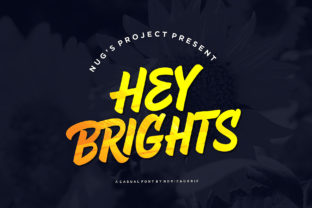
Hey Brights: A Friendly All-Caps Display Font
Hey Brights is a bold, all-caps display font designed to stand out—without feeling stiff or overly formal. It’s got that relaxed, hand-drawn charm you’d expect from a friendly chalkboard sign or a playful café menu, but with clean digital precision. Think of it as the kind of typeface that says “hello” with a smile and a wave—not a handshake in a suit.
What Makes Hey Brights Different?
Unlike many display fonts that lean into sharp edges or exaggerated quirks, Hey Brights balances personality with readability. Its letters are rounded, slightly uneven, and full of gentle contrast—giving it warmth and approachability. Because it’s all-caps only, it works best for short bursts of text: headlines, logos, posters, social media graphics, or product packaging. You wouldn’t use it for a blog post or a textbook—but you *would* reach for it when you want energy, friendliness, and visual impact in just a few words.
Why People Choose Hey Brights
Creators often pick Hey Brights when they need something that feels human-made—not AI-perfect. Small business owners love it for branding elements that reflect authenticity: think handmade soap labels, indie bookstore banners, or yoga studio Instagram stories. Educators use it for classroom posters or student project titles where clarity meets cheerfulness. Freelancers and bloggers apply it to newsletter headers or course module titles to add visual rhythm without overwhelming the content.
It’s especially helpful if you’ve ever struggled with fonts that feel either too corporate or too childish. Hey Brights sits comfortably in the middle—casual enough for a weekend market stall, polished enough for a boutique website banner.
Real-Life Uses You Can Try Today
- Social media graphics: Pair Hey Brights with a soft pastel background for an Instagram quote card or event announcement—it draws attention while keeping things light and inclusive.
- Printed merchandise: Use it on tote bags, stickers, or greeting cards where legibility at small sizes matters (just avoid going smaller than 24pt for print).
- Digital ads: In platforms like Facebook or Pinterest, Hey Brights helps your headline pop in crowded feeds—especially when paired with ample white space and a single supporting image.
- Educational materials: Teachers create engaging bulletin board headers or activity station signs that students find inviting—not intimidating.
- Branding accents: It works beautifully as a secondary font alongside a clean sans-serif (like Inter or Open Sans) for logos, taglines, or button labels on websites and apps.
Where Hey Brights Fits—and Where It Doesn’t
Because Hey Brights is built for impact, not endurance, it shines brightest in contexts where brevity is key. It’s not meant for long paragraphs, body copy, or interfaces requiring fine typographic control. If you’re designing a multi-page report or a data dashboard, stick with more neutral, highly legible fonts for the main text—and bring in Hey Brights only for section titles or callouts.
Also keep in mind: its casual nature means it may not suit ultra-formal industries like law firms or financial institutions—unless used very intentionally, like for a progressive fintech brand aiming to feel refreshingly transparent.
Things to Consider Before Using Hey Brights
- Legibility at small sizes: On mobile screens or tiny icons, some letterforms (like the lowercase-style “O” or connected “A” and “V”) can blur together. Always test at actual usage size.
- Language support: Hey Brights includes standard Latin characters and common punctuation, but doesn’t cover extended diacritics or non-Latin scripts. If your audience uses accented characters regularly, check the character set before committing.
- Pairing wisely: It pairs best with simple, airy fonts—avoid other decorative or high-contrast typefaces nearby. Let Hey Brights be the star; give it breathing room and a calm supporting cast.
- Licensing for commercial use: While many versions are free for personal projects, double-check the license if you’re using it in client work, merchandise, or apps. Some variants require attribution or a one-time fee.
- Color contrast: Its rounded, medium-weight forms respond well to strong color combos—deep navy on cream, coral on charcoal—but fade against busy backgrounds. Always preview with your intended palette.
Getting Started Is Simple
You don’t need design experience to use Hey Brights effectively. Start by downloading it from a trusted source (like Google Fonts, if available, or the original designer’s site). Then open your tool of choice—Canva, Figma, Adobe Express, or even PowerPoint—and try it on a mock-up of something real: your next Instagram story, a workshop flyer, or a new logo concept.
Try this quick experiment: Type three words—like “Fresh Baked Joy”—in Hey Brights at 60pt. Now switch to a standard sans-serif at the same size. Notice how the tone shifts? That’s the power of intentional typography. Hey Brights doesn’t just say the words—it sets the mood.
A Font With Personality—and Purpose
At its core, Hey Brights is about making communication feel more human. In a world full of algorithm-driven feeds and templated designs, choosing a font like this is a small act of intention. It tells your audience: “This was made with care. This is meant to connect—not just inform.”
Whether you're launching a side hustle, sprucing up your classroom, or building your first portfolio site, Hey Brights gives you a way to express energy and warmth without saying a word more than necessary. And sometimes, that’s exactly what your message needs.