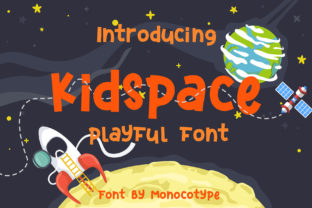
Kidspace: A Playful Display Font for Kids’ Projects
Kidspace isn’t just another children’s font—it’s a thoughtfully crafted display typeface built around personality, legibility, and joyful expression. Each character carries subtle quirks: rounded terminals, gentle asymmetry, and friendly proportions that invite attention without overwhelming young eyes. Designed specifically for short-form, high-impact use—think headlines, posters, packaging, and digital banners—it balances visual charm with functional clarity. Unlike overly cartoonish fonts that sacrifice readability or sterile sans-serifs that feel emotionally flat, Kidspace lands in a sweet spot: warm enough for preschool storytime, polished enough for a boutique toy brand’s website.
Why Designers Reach for Kidspace (Beyond “It Looks Cute”)
What makes Kidspace genuinely useful—not just decorative—is how its design decisions serve real creative goals. The generous x-height improves recognition at small sizes on tablets or classroom printouts. Slightly widened letter spacing prevents crowding in bold display settings. And the consistent stroke contrast (not too thin, not too heavy) ensures it holds up across both screen and print—whether you’re exporting a PNG for Instagram or running a 24-point headline through a laser cutter.
It’s also intentionally versatile within its category. While many kids’ fonts lean hard into one style—scribbly, blocky, or ultra-rounded—Kidspace offers quiet flexibility. You can pair it with a clean, neutral sans-serif (like Inter or Open Sans) for balance, or layer it with hand-drawn icons for a cohesive DIY aesthetic. That adaptability means it works whether you’re designing a bilingual kindergarten newsletter or prototyping a literacy app interface.
Ideas That Actually Work—Across Roles and Platforms
Here’s where Kidspace shines in practice—not as a theoretical option, but as a tool that solves specific problems:
- Educators: Use Kidspace for weekly classroom schedules printed on bright cardstock. Its openness helps early readers distinguish similar letters (like b and d) more easily than tightly drawn alternatives. Keep body text in a highly legible reading font—Kidspace stays where it belongs: titles, labels, and callouts.
- Small business owners: A local children’s bookstore used Kidspace for shelf-talkers and event flyers. They paired it with soft coral and sage green, then added simple line-art illustrations of books and animals—no extra graphics needed. The result felt approachable, locally made, and distinct from big-box retail branding.
- Bloggers & content creators: One parenting blogger uses Kidspace only for section headers in her printable activity kits (“Rainbow Sorting Cards”, “Feelings Chart”). She exports each header as a transparent PNG, layers it over minimal photo backgrounds, and keeps all other text in a web-safe font. It adds visual rhythm without slowing load time or confusing screen readers.
- Freelance designers: When pitching to a client launching an eco-friendly kids’ clothing line, one designer mocked up three versions of a hangtag: one with Kidspace + recycled kraft paper texture, one with a geometric sans, and one with a script font. The Kidspace version tested highest for “friendly” and “trustworthy”—key emotional cues for parents evaluating sustainable brands.
Keeping It Clear, Consistent, and Age-Appropriate
Playfulness shouldn’t mean chaos. To keep Kidspace effective—and avoid visual fatigue—apply these practical filters:
- Reserve it for hierarchy: Use Kidspace only for primary headlines, logos, or key interactive elements (e.g., “Tap to Play” buttons). Never for long paragraphs, captions under photos, or navigation menus. Your audience should instantly know what matters most on the page.
- Test contrast rigorously: Pair Kidspace with background colors that meet WCAG 2.1 AA standards (at minimum 4.5:1 for normal text). Light yellow on white may look cheerful—but fails accessibility checks and strains eyes. Try deep teal on cream instead.
- Limit stylistic variations: Kidspace includes regular and bold weights—but no italics or condensed variants. Don’t force stretch or skew in design software. If you need emphasis, use color, size, or proximity—not distortion.
- Consider cultural context: In bilingual materials, ensure Kidspace doesn’t compete visually with non-Latin scripts. For example, when pairing with Spanish or Arabic text, let Kidspace anchor English headings while the secondary language uses a harmonizing, highly legible companion font.
Realistic Pairings and Production Tips
You don’t need a full font family to build strong visuals. Kidspace works best when treated like a focused instrument—not the whole orchestra. Try these grounded combinations:
- For printables and worksheets: Kidspace (headline) + Nunito (body). Nunito’s open counters and gentle curves echo Kidspace’s warmth without mimicking it.
- For digital interfaces: Kidspace (button labels, feature cards) + Inter (UI text, instructions). Inter’s exceptional screen readability grounds the playfulness.
- For packaging or merch: Kidspace (product name) + a subtle, custom-drawn icon set (e.g., a matching set of animal silhouettes or nature elements). This creates cohesion without relying solely on typography.
When exporting assets, always outline Kidspace text before sharing final files with printers or developers—this prevents substitution if the font isn’t installed. For web use, serve it via a reliable font host (like Google Fonts or Adobe Fonts) and define fallbacks: font-family: "Kidspace", system-ui, sans-serif;. And remember: even the friendliest font loses impact if it’s competing with cluttered layouts or inconsistent margins. Give it room to breathe.
Not Just for “Kids’ Stuff”—A Tool for Human-Centered Design
What makes Kidspace quietly powerful is how it supports intentionality. It encourages creators to ask better questions: Who is actually reading this? What action do I want them to take? How much cognitive load am I adding—or reducing? Using Kidspace well means respecting children’s developing visual literacy, parents’ need for quick comprehension, and educators’ demand for durability across formats.
That’s why it shows up in thoughtful places: a pediatric clinic’s vaccination reminder postcard, a museum’s tactile exhibit guide for neurodiverse visitors, or a nonprofit’s grant application showing early childhood program impact. In each case, Kidspace isn’t dressing something up—it’s helping information land with clarity, kindness, and quiet confidence.
If you’ve been reaching for fonts that feel either too childish or too cold, consider Kidspace as a bridge: professional enough for serious work, human enough to make people pause, smile, and stay engaged—even for just a few seconds longer.