Malesty: A Bold Display Font for High-Impact Visual Communication
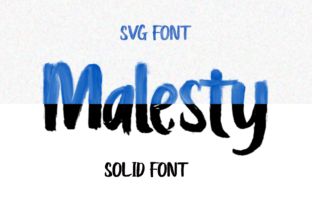
Malesty isn’t a font you reach for when you need subtlety. It’s the kind of typeface that announces itself—rough-edged, confidently uneven, and full of expressive energy. Designed as a bold display font with intentional grungy texture, Malesty excels where clarity meets character: headlines, posters, social media banners, branding accents, and any visual moment that demands attention without apology.
Unlike system fonts or neutral sans-serifs built for body text, Malesty lives at the intersection of intention and impact. It doesn’t blend in—it anchors. That makes its role in your creative or professional workflow highly specific: it’s rarely the first tool you open, but often the final, decisive touch that elevates tone, reinforces identity, or signals a shift in hierarchy.
Where Malesty Fits in Your Workflow
Think of Malesty as a strategic punctuation mark—not part of the sentence, but essential to how the sentence lands. Its value emerges most clearly when placed within a broader process: planning → designing → refining → publishing. It rarely drives early-stage ideation (where legibility and flexibility matter more), but becomes indispensable during refinement and output.
For example, a small business owner finalizing a product launch campaign might draft copy in a clean, readable font like Inter or Open Sans. Only after messaging is locked—and visual direction confirmed—does Malesty enter the frame: applied to the hero headline on the landing page, the Instagram carousel title slide, or the limited-edition packaging banner. That timing matters. Introducing Malesty too early can distract from content evaluation; introducing it too late risks inconsistent tone across assets.
Using Malesty Before, During, and After a Project
Before: Preparation means understanding constraints. Check licensing—Malesty is typically offered with commercial use rights, but verify whether web, desktop, and app embedding are covered under your license tier. Download the full family (if available) and test rendering across devices. Not all browsers handle textured outlines identically, especially at smaller sizes or on low-DPI screens. Preview how it pairs with your primary body font—contrast in weight and texture should feel deliberate, not jarring.
During: Use Malesty only where hierarchy and emphasis justify its presence. In Figma or Adobe XD, apply it exclusively to top-level headings, callout boxes, or logo lockups—not navigation menus, form labels, or paragraph leads. Its roughness adds visual weight, so balance it with generous whitespace and restrained color choices. A single Malesty headline against a muted background often outperforms multiple styled elements competing for dominance.
After: Audit consistency before publishing. Does every instance of Malesty serve the same functional purpose? Is size, spacing, and color treatment uniform across platforms? A blog post header using Malesty at 48px/line-height 1.1 should visually echo the same treatment on an email subject line preview—even if technical implementation differs (e.g., CSS font-size vs. inline HTML styles). This isn’t about rigidity—it’s about reinforcing recognition through repetition.
Integration With Other Tools and Assets
Malesty works best when treated as a component—not a standalone solution. In design systems, it sits alongside defined color palettes, spacing scales, and typography tokens. If you use Tailwind CSS, define a custom class like .font-malesty tied to a specific font-weight and letter-spacing value—not just the font family. That ensures developers and designers reference the same behavior.
In CMS environments like WordPress or Webflow, upload Malesty as a web font (WOFF2 preferred) and declare it in @font-face rules before assigning it to heading tags. Avoid loading it on every page—only enqueue it where it’s actually used. For static sites generated via Hugo or Jekyll, conditionally include the font link in layouts that render featured posts or landing pages, not blog archives or footers.
When paired with photography or illustration, Malesty’s grunge complements high-contrast, tactile imagery—think film grain, hand-drawn lines, or raw textures. It clashes with overly polished 3D renders or hyper-smooth gradients unless intentionally juxtaposed for irony or disruption. Test combinations at actual size: what reads as edgy on a retina display may look muddy on a printed flyer at 10% scale.
Practical Implementation Tips
- Leverage optical sizing: If the Malesty family includes optical variants (e.g., “Malesty Display” vs. “Malesty Text”), use the display version strictly for sizes above 36px. Smaller applications benefit from cleaner outlines and adjusted spacing.
- Adjust letter-spacing manually: Default tracking often feels too tight for Malesty’s irregular shapes. Add +20–40 units of tracking in design tools—or letter-spacing: 0.04em in CSS—to prevent visual crowding.
- Pair with function-first fonts: Combine Malesty with a highly legible, neutral sans-serif (e.g., Inter, Manrope, or IBM Plex Sans) for body copy. Avoid pairing with other decorative or distressed fonts—clarity suffers.
- Test readability in context: Run a quick five-second test: show a colleague the layout for five seconds, then ask what stood out. If Malesty didn’t register—or if it distracted from the core message—reduce its scope or adjust contrast.
Long-Term Use and Quality Control
Because Malesty carries strong personality, overuse dilutes its effect. Treat it like a signature ingredient: powerful in moderation, exhausting in excess. Revisit usage guidelines every quarter. Ask: Are we still applying Malesty to the same strategic touchpoints? Has our brand voice evolved in a way that makes its roughness feel misaligned? Small shifts in audience or platform (e.g., moving from Instagram-first to LinkedIn-focused outreach) may warrant tonal recalibration—even if the font stays.
Keep a shared asset library updated with approved Malesty usage examples: correct file formats, fallback stacks, responsive size ranges, and banned contexts (e.g., “Never use below 28px on mobile,” “Never overlay on busy backgrounds without a subtle drop shadow”). Documenting these decisions reduces friction during handoffs between designers, developers, and marketers—and prevents drift across campaigns.
Also consider accessibility implications. While Malesty itself isn’t WCAG-compliant for body text (and shouldn’t be used that way), ensure all interactive elements using it—like primary buttons or section headers—meet contrast minimums (4.5:1 against background). Use browser dev tools to simulate color blindness modes and verify information isn’t conveyed by texture alone.
Real-World Workflow Examples
A freelance educator launching an online course might use Malesty in three precise places: the course title on the sales page, the chapter header in video thumbnails, and the “Enroll Now” button hover state. Everything else—syllabus, lesson transcripts, email sequences—relies on accessible, scalable fonts. This creates instant visual recognition while preserving readability where learning happens.
A local café redesigning its seasonal menu could apply Malesty to the featured drink name (“Smoked Maple Latte”) and the month (“OCTOBER SPECIALS”), but keep food descriptions in a clean, high-legibility serif like Playfair Display. The result feels curated, not chaotic—grunge serves flavor, not function.
For a newsletter publisher, Malesty might appear only in the subject line preview text (via HTML font-family fallbacks) and the hero banner of the web version—never in article intros or list items. Subscribers scan quickly; Malesty gives them one unmistakable anchor before they decide to read further.
Malesty doesn’t solve problems—it sharpens focus. Its value lies not in versatility, but in precision. When you know exactly where impact matters most, Malesty delivers it—unapologetically, memorably, and with unmistakable texture. Use it where attention must be claimed, not asked for. And when it’s time to step back and let content breathe? That’s when you switch fonts—and keep working.