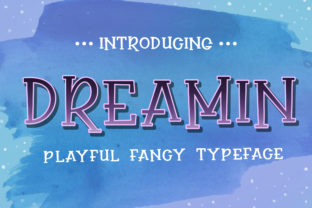
Dreamin: A Playful Display Font That Fits Real Creative Workflows
Dreamin isn’t a tool for every line of text—but when you need a burst of personality, spontaneity, or lighthearted contrast in your design, it lands with unmistakable presence. It’s a display font built for moments that call for expressive energy: a workshop title that invites curiosity, a book cover that hints at imagination, or a product launch page that refuses to take itself too seriously. Unlike system fonts or neutral sans-serifs designed for broad legibility, Dreamin thrives in intentional, limited-use contexts—where its irregular letterforms, uneven baseline, and comic rhythm become assets, not obstacles.
Where Dreamin Fits in Your Design Process
Think of Dreamin as a strategic accent—not a foundation. In most visual workflows, it enters after structure is established: once layout grids are defined, content hierarchy is mapped, and the core message is clear. That’s when you ask: Where does this project need breathing room, surprise, or warmth? That question often points to headlines, section dividers, callout quotes, or branding elements like event badges or social media banners. Using Dreamin earlier—say, before wireframing or copywriting—is rarely productive. Its expressive nature can distract from structural decisions or mislead early feedback about tone.
Conversely, using it too late—after final export or handoff—adds friction. If you’re preparing files for a developer or print vendor, embedding Dreamin correctly (via web font hosting or proper OTF/TTF inclusion) matters. Skipping font licensing checks or assuming fallbacks will preserve intent leads to inconsistent rendering. So while Dreamin shines in the “polish” phase, preparation begins sooner: verifying license scope (e.g., web, desktop, app), confirming file formats match your platform’s requirements, and testing rendering across devices.
Integration With Common Tools and Platforms
Dreamin works cleanly in tools where font management is explicit and controllable. In Figma or Adobe XD, it installs like any local font—just activate it in your system, then select it in the type menu. No plugins needed. For web projects, self-hosting the font files gives you full control over loading behavior and performance; pairing it with @font-face declarations and font-display: swap ensures text remains visible during load. Avoid relying solely on third-party font services unless they explicitly list Dreamin—it’s not part of Google Fonts or Adobe Fonts libraries.
In CMS environments like WordPress or Webflow, use Dreamin sparingly in custom CSS blocks or heading styles—not inline. Why? Because consistency depends on predictable application. If you apply it via class names (e.g., .hero-title--dreamin), you retain control over where and how it appears, making future edits faster and reducing accidental reuse in body text or navigation menus.
Practical Implementation Tips
Start with contrast. Pair Dreamin with a highly legible, neutral companion—like Inter, Lato, or even Georgia. Let Dreamin handle the emotional hook; let the supporting font carry information. This isn’t just aesthetic—it’s functional. Readers scan first, then read. Dreamin draws the eye; the secondary font sustains comprehension.
Limit scope by role, not count. Instead of saying “use Dreamin only three times per page,” define its purpose: “Dreamin appears only in primary headlines above 36px, never in paragraphs, forms, or data tables.” That rule scales across templates and reduces subjective interpretation during team handoffs.
Test readability at real sizes. Dreamin’s playfulness comes with trade-offs: some characters (like lowercase a, g, or q) have exaggerated shapes that reduce clarity below ~28px. Use it large—48px and up for web headers, 72pt+ for print posters—and always preview on mobile. What reads as charming on desktop may blur into abstraction on a small screen.
Watch spacing. Its irregular baseline means default tracking and leading often feel too tight. Add 5–10% extra letter-spacing for headlines. Increase line-height by 1.4–1.6x when used in multi-line settings. These aren’t arbitrary tweaks—they compensate for Dreamin’s inherent visual density.
Workflow Examples Across Roles
For educators: Use Dreamin in slide deck titles for student-facing workshops (“Let’s Build a Story!”), but switch to Open Sans for learning objectives and instructions. The font signals invitation—not instruction—helping shift mindset before content delivery.
For small business owners: Apply Dreamin to seasonal promotion banners (“Summer Dreams Sale!”) on your homepage, but keep product descriptions, pricing, and CTAs in a reliable sans-serif. This creates psychological separation: emotion first, action second.
For freelance designers: Include Dreamin usage guidelines in your brand style guide—not just as a sample, but as a decision tree: “Use Dreamin only when the client’s voice is explicitly playful, irreverent, or youth-oriented. If unsure, present two options: one with Dreamin (labeled ‘Expressive’) and one without (labeled ‘Clear’).” That surfaces assumptions early and aligns expectations.
Long-Term Usability and Consistency
Dreamin holds up best when treated as a deliberate choice—not a default. Overuse dilutes its impact and risks visual fatigue. Teams that adopt it successfully often document usage in shared design systems: specifying exact weights (it ships in Regular and Bold), approved color pairings (high-contrast combinations work best), and banned contexts (e.g., legal disclaimers, error messages, accessibility labels).
Compatibility is straightforward—Dreamin is a standard OpenType font, so it renders reliably in modern browsers and design apps. But watch for legacy environments: older email clients or PDF generators may substitute fonts if embedding isn’t enforced. When sending branded PDFs, outline text or embed fonts manually. When building emails, stick to web-safe fallbacks and reserve Dreamin for hero images—not live text.
Quality control starts with proofing. Because Dreamin’s irregularity means no two lines look identical, check line breaks carefully. Avoid breaking words mid-flow where a quirky glyph (like the looping y) falls awkwardly at the end of a line. Also verify that bold weight maintains the same whimsical character—some display fonts lose personality when thickened, but Dreamin’s Bold retains its bounce.
When Dreamin Isn’t the Right Choice
It’s equally important to recognize where Dreamin doesn’t belong. Avoid it in interfaces requiring speed or precision: dashboards, forms, code documentation, or technical illustrations. Don’t use it for long-form reading, multilingual content with complex scripts, or accessibility-critical elements like alt text labels or screen reader announcements. Its strength is emotional resonance—not neutrality or universality.
If your goal is trust through familiarity (e.g., financial services, healthcare, academic publishing), Dreamin’s playfulness may undercut credibility. That’s not a flaw—it’s a signal. Matching font personality to audience expectation is part of responsible implementation.
Final Integration Note
Dreamin integrates smoothly when you treat it like a collaborator—not a decoration. It asks for context, intention, and restraint. Install it. Test it. Define where it lives in your system. Then use it where a little irregularity makes the message more human, more memorable, more you. Not everywhere. Not always. But exactly where it’s needed.