Rubber: A Bold, Playful Display Font for High-Impact Design
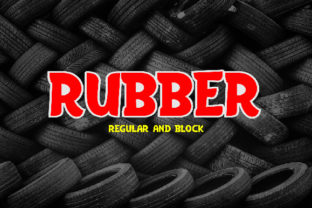
Rubber is a display typeface designed to command attention—not through aggression or excess, but through confident, bouncy rhythm and expressive character. It’s not a font you’d use for body text or long-form reading. Instead, Rubber excels where visual energy matters most: headlines, posters, packaging, social media banners, and branding elements that need to stand out in split-second glances.
What sets Rubber apart isn’t just its exaggerated letterforms—it’s the intention behind them. Each glyph balances proportion with personality: rounded terminals, soft curves, and subtle optical adjustments that keep letters legible even at large sizes. The uppercase ‘R’, for example, features a spring-like loop that hints at elasticity without sacrificing clarity. Lowercase characters maintain consistent x-height and open counters, helping readability hold up across varied applications. Unlike many playful fonts that lean into cartoonish exaggeration, Rubber stays grounded in typographic discipline—making it more versatile than it first appears.
Where Rubber Fits in the Display Font Landscape
Display fonts fall along a spectrum—from restrained and elegant (think Didot-inspired serifs) to exuberant and experimental. Rubber sits firmly in the latter half, but avoids the pitfalls of novelty-only design. It shares conceptual space with other “friendly bold” fonts—but differs in execution. Some alternatives prioritize extreme weight contrast or irregular stroke modulation; Rubber opts for uniform thickness with intentional softness. That makes it easier to pair with neutral sans-serifs or clean geometric typefaces without clashing tonally.
Compared to handwritten or brush-script display fonts, Rubber offers greater consistency and scalability. A hand-drawn alternative might feel authentic in a single-use illustration, but can break down when resized, kerned tightly, or rendered across devices. Rubber was built with digital environments in mind: its outlines are optimized for crisp rendering on screens, and its spacing accounts for variable screen densities and common web font loading behaviors.
Strengths That Extend Beyond Aesthetics
Rubber’s primary strength lies in emotional resonance. It conveys approachability, creativity, and lighthearted confidence—qualities especially valuable for brands targeting younger adults, education platforms, wellness initiatives, or creative agencies. When used thoughtfully, it signals that a brand doesn’t take itself too seriously—but still takes its craft seriously.
Another practical advantage is its relative simplicity in implementation. Unlike variable fonts with dozens of axes or families requiring extensive language support, Rubber ships as a focused set—typically regular and bold weights, sometimes with an italic variant. This keeps file sizes manageable and integration straightforward, whether embedded via CSS @font-face, loaded through a font service, or installed locally for print workflows.
Its letterforms also respond well to color and texture treatments. Because Rubber relies less on fine detail and more on silhouette and rhythm, it adapts gracefully to gradients, overlays, and subtle noise effects—unlike high-contrast serif or ultra-thin sans-serif fonts that can lose integrity under similar treatments.
Tradeoffs to Acknowledge Before Committing
No display font works everywhere—and Rubber is no exception. Its defining traits become limitations in certain contexts. Most notably, Rubber isn’t suitable for interface labels, navigation menus, or data-dense layouts. Its generous curves and relaxed spacing reduce character distinction at small sizes, increasing cognitive load for users scanning quickly. If your project includes UI components—even secondary ones like filter tags or status badges—Rubber should remain reserved for hero areas only.
Legibility in low-contrast settings is another consideration. While Rubber performs well against solid backgrounds, it can soften when placed over busy imagery or light-on-light combinations. Testing contrast ratios (especially for accessibility compliance) is essential—not because Rubber fails outright, but because its soft edges require more deliberate background treatment than starker alternatives.
There’s also a contextual tradeoff: Rubber’s tone is unmistakable. That’s an asset when alignment with brand voice is clear—but a liability if your messaging spans multiple registers (e.g., technical documentation alongside promotional campaigns). In those cases, a modular system—where Rubber anchors key moments while a neutral workhorse handles supporting text—often delivers better long-term flexibility.
When Rubber Is the Right Choice
Rubber shines in projects where hierarchy, emotion, and memorability converge. Consider it for:
- Event branding—festivals, workshops, or conferences aiming for inclusive, energetic vibes;
- Educational materials—children’s learning apps, university campaign posters, or STEM outreach where warmth helps lower perceived barriers;
- Product packaging—especially for lifestyle, food, or beauty items where tactile appeal and friendliness reinforce shelf presence;
- Social-first visuals—Instagram carousels, TikTok thumbnails, or email headers where instant recognition outweighs nuanced typography.
In each case, Rubber isn’t just decoration—it functions as a visual shorthand. A headline in Rubber tells viewers, “This isn’t formal. It’s inviting. It’s human.” That implicit message carries weight, especially amid algorithm-driven feeds where attention is fragmented and fleeting.
When Another Option Might Serve Better
Rubber may not be the best fit if your goals emphasize timelessness, authority, or precision. Legal firms, financial services, academic journals, or enterprise software dashboards typically benefit from fonts that signal stability and neutrality—traits Rubber intentionally sets aside. In those cases, a robust grotesk or a refined humanist sans-serif often supports credibility more effectively.
Likewise, if multilingual support is critical—especially for languages with extended Latin diacritics, Cyrillic, or Greek—verify Rubber’s character set thoroughly. Not all display fonts include comprehensive language coverage, and retrofitting missing glyphs can compromise visual harmony. When global reach matters, cross-checking OpenType features and script support isn’t optional—it’s foundational.
And while Rubber scales beautifully in large formats, it doesn’t solve underlying design challenges. Pairing it with poor layout, inconsistent spacing, or mismatched imagery won’t yield better results. Its effectiveness depends on thoughtful composition—not just font selection.
Making a Practical Decision
Choosing Rubber—or any display font—is less about finding the “best” option and more about matching intent, audience, and environment. Ask yourself:
- What feeling should this element evoke? If “playful but polished” aligns with your brand’s current voice, Rubber is worth testing.
- Where will it appear—and at what size? If it’s confined to large-format applications (billboards, presentation slides, hero banners), Rubber’s strengths are maximized.
- How much supporting typography does the project require? Rubber works best as part of a considered system—not as a solo performer.
- Do technical constraints allow for reliable delivery? Confirm browser support, licensing scope (web, app, desktop), and fallback behavior before finalizing.
Testing Rubber alongside real content—not just lorem ipsum—is essential. Try it with actual headlines, product names, and calls to action. Observe how it behaves across devices and connection speeds. Compare it side-by-side with alternatives that share its spirit but differ in structure: slightly tighter spacing, reduced curve amplitude, or added contrast. Subtle shifts can significantly affect perception and usability.
Rubber doesn’t promise universal appeal—and it shouldn’t. Its value lies in specificity: delivering unmistakable presence where it counts, without pretending to do everything. For designers and communicators who understand that restraint and boldness aren’t opposites—but complementary tools—Rubber becomes not just a font choice, but a strategic one.