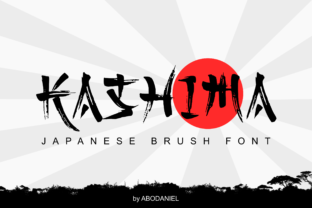
Kashima: Bold Display Font, Clear Creative Impact
When a headline needs to command attention—not just occupy space—Kashima delivers. It’s not another decorative novelty; it’s a purpose-built display font with structural confidence, generous letterforms, and a bold feel that reads clearly at scale. Designed for impact without sacrificing legibility, Kashima works where many display fonts falter: on screens, in print, across sizes, and alongside simpler typefaces.
What Makes Kashima Stand Out (Without Standing Apart)
Kashima balances weight and openness. Its uppercase letters are wide, grounded, and slightly geometric—but softened by subtle curves and consistent stroke contrast. Lowercase characters maintain presence without competing; they’re designed to support, not distract. The spacing is generous by default, which means less manual kerning for headlines, posters, or social banners. And unlike ultra-condensed or overly stylized display fonts, Kashima doesn’t require context to be understood—it communicates tone *and* content at a glance.
This isn’t about trend-chasing. It’s about having a reliable tool that solves real problems: How do I make my workshop title feel inviting but authoritative? How do I give a product launch banner visual authority without shouting? How do I keep branding cohesive when moving from Instagram story to printed flyer? Kashima answers those questions with consistency—not compromise.
Creative Uses That Go Beyond the Obvious
Most designers reach for Kashima first in headlines—and rightly so. But its versatility shines when used intentionally in less expected ways:
- Logo lockups: Paired with a neutral sans-serif (like Inter or Manrope), Kashima adds memorability without sacrificing scalability. Try it in solid black on white for small business signage—or in a single accent color for podcast cover art.
- Editorial section dividers: Use Kashima at 48–60px to label recurring columns (“Studio Notes”, “Tool Deep Dives”, “Reader Stories”) in digital newsletters or zines. Its clarity helps readers navigate quickly, even on mobile.
- Physical product labeling: Because Kashima renders cleanly at small sizes (down to ~24px in print), it works well on packaging labels, workshop supply tags, or ceramic stamp impressions—where legibility and character both matter.
- Interactive UI accents: Not for body text—but perfect for primary action buttons (“Enroll Now”, “Get Started”, “Join Us”) in course dashboards or portfolio sites. Its weight signals importance without needing extra icons or animations.
Real Projects, Real Decisions
A freelance educator redesigned her online course landing page using Kashima for module titles and key benefit statements. She kept body text in a relaxed serif (Cormorant Garamond) and used only two colors: charcoal and warm terracotta. Result? A 22% increase in time-on-page and stronger scroll depth—readers paused longer at each Kashima-labeled section because the hierarchy felt intentional, not decorative.
A local pottery studio applied Kashima to hand-stamped clay tags and Instagram highlight covers. They avoided all-caps in favor of title case (“Glazed Stoneware”, “Wheel Throwing 101”)—letting Kashima’s natural rhythm shine. Customers began referencing the tag lines unprompted: “That ‘Slow Craft’ tag? I loved it.” Tone became part of the product experience.
Adapting Kashima Across Audiences and Platforms
Who you’re speaking to changes how Kashima functions—not what it *is*, but how it’s framed and supported:
- For educators and creators: Use Kashima to signal learning milestones (“Your First Sketch”, “Week Three: Refine & Reflect”). Pair it with ample whitespace and short supporting sentences. Avoid stacking multiple Kashima elements—let one strong use anchor each idea.
- For small business owners: Apply Kashima consistently to your most visible customer touchpoints—store window decals, receipt headers, email subject lines (yes—even plain-text previews benefit from clear, bold phrasing). Consistency builds recognition faster than logos alone.
- For marketers and bloggers: Test Kashima in subject lines and social post headers—not as a gimmick, but as a clarity tool. “What You’re Missing About Email Open Rates” reads more trustworthy in Kashima than in a thin, trendy script. It says, “This matters. Read it.”
- For hobbyists and makers: Don’t overthink pairing. Try Kashima + system fonts (Helvetica, Georgia, even system-ui). Print a test sheet with your most-used phrases (“Handmade in Portland”, “One-of-a-Kind”, “Made With Care”) at different sizes. See what feels true—not just eye-catching.
Keeping It Effective, Not Just Eye-Catching
Bold doesn’t mean uncontrolled. To keep Kashima working *for* your message—not against it:
- Limits work in your favor: Use Kashima for no more than one typographic role per layout (e.g., headlines only, or only logo + CTA buttons). Let other fonts handle nuance.
- Test contrast early: On screens, Kashima’s weight demands sufficient background contrast. Avoid light gray text on white, or dark navy on black. Stick to WCAG AA minimums—especially for accessibility-conscious audiences.
- Respect its rhythm: Kashima thrives with breathing room. Add 1.4–1.6x line-height in headings, and generous padding around any Kashima element. Crowding undermines its strength.
- Think beyond black: Try deep forest green, slate blue, or burnt umber instead of pure black. These tones retain Kashima’s authority while softening formality—ideal for wellness brands, creative studios, or community initiatives.
Finally, remember: Kashima doesn’t replace strategy—it sharpens it. If your message is unclear, no font will fix that. But if your idea is solid, Kashima gives it the visual weight it deserves. It won’t solve vague positioning or inconsistent voice. But it *will* make confident choices look and feel more confident.
So ask yourself: Where does your audience need clarity first? Not decoration. Not flair. Just unmistakable, respectful, human-centered emphasis. That’s where Kashima earns its place—not as an afterthought, but as a deliberate decision.